The idea
A kit only helps you once a real person knows how to use it. The Skills Tracker is where your household records who can do each thing, so equipment becomes capability. It pulls the strongest kit matches from your plan, adds eight Foundations skills, and lets you mark where each member stands.
Using it
Open the page from your BeReady plan, or go straight to /beready/skills. At the top you will see a short progress line ("Your household has built capability on X of Y kits"), then two grids.
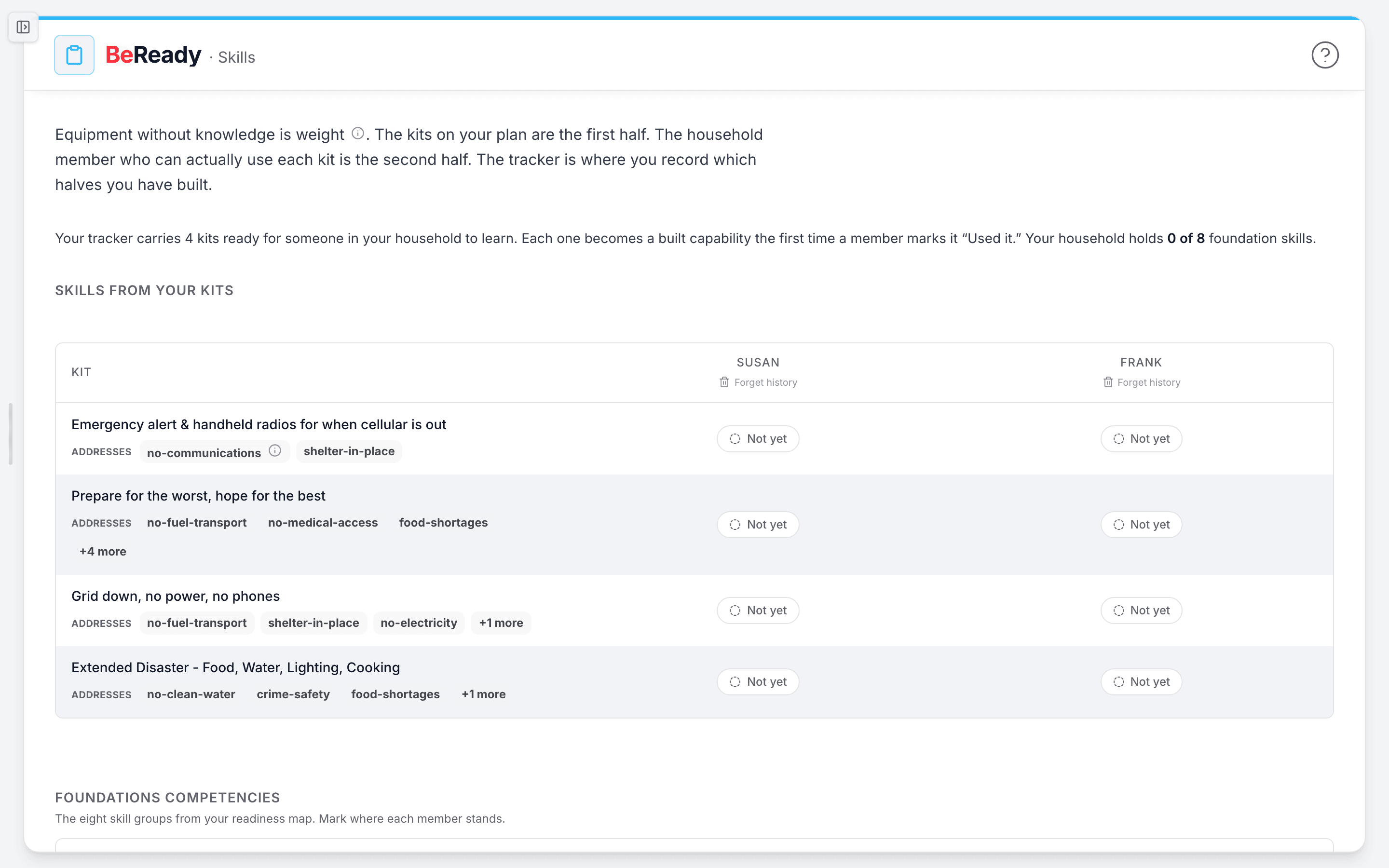
- Read the layout. Each row is something to learn. Each column is a household member, pulled from your plan's roster. Every cell shows where that member stands as a small pill with a label and an icon, so you can scan the whole household at a glance.
- Mark a skill. Tap any cell to open its dialog. For a kit it asks "Has [member] used this to completion?" Pick one of three answers: Not yet, Learning, or Used it. Your choice saves right away and the pill updates. When you mark "Used it," the date is recorded and shown in the dialog footer.
- Work the two sections. The top grid, Skills from your kits, lists the kits your plan ranks as Better or Best matches for your household. Below it, Foundations competencies lists the eight core skill groups every household needs: Power, Water, Food, Communications, Fuel, Medical, Safety, and Transport. Each one carries a one-line description of what the person can do once they have learned it.
- Mark mastery on a foundation. Competency cells offer a fourth state. The dialog asks "Does [member] have competency in this skill?" with Not yet, Learning, Learned, and Practiced. "Learned" means they hold the skill. "Practiced" means they hold it and have drilled it. Both count toward your household total. "Learning" does not.
- Watch the count. The summary line totals kits where at least one member has marked "Used it," plus the foundation skills your household holds. It counts per item, not per person, so one member learning a skill counts the whole household as covered.
- On a phone, the grids stack into one calm card per member with their statuses listed beneath, so the same marking works without a wide table.
What to do when ...
- The page says you have no plan, no roster, or no kits yet. Each empty state names one next step (Start your plan, Open your plan) and a quiet Run a drill link. Generate or open a BeReady plan, and the tracker fills in once your plan ranks a kit at Better or Best.
- A kit drops off your plan after you regenerate. Its completion history is kept under a collapsed Past recommendations section at the bottom, listing the members who marked it. Nothing you recorded is lost.
- A save fails. The dialog shows an inline message and your pill reverts to its previous state. Try again, and nothing is left half-saved.
- A member leaves the household. Use Forget history by their name to remove their rows for good. The rest of your household's record stays untouched, and there is no undo.
How people actually use it
A parent opens the tracker after a plan refresh and sees the water-filter kit sitting at "Not yet" for everyone. They spend a weekend afternoon walking their teenager through it, then mark the teen "Used it." The next time the power goes out, they already know who in the house can run it.
Another household treats the Foundations grid as a quiet checklist. One adult is "Practiced" on CPR and first aid. The other is only at "Learning." Seeing that gap in plain view is what finally gets the second adult signed up for a class.
Where this fits
The tracker is the Practice step in the loop that runs from knowing your risk to watching for change, having a plan, having supplies, practicing, and getting expert help. It turns the kits on your BeReady plan and the supplies on your supply list into skills your family can count on. A natural next step is to run a drill and mark what you practiced.